Sony App Update Sony Sketch 4.2 app 2.0.A.1.6 version
Sony has update thire Sketch App Version 4.1 To Sketch 4.2 And App version 2.0.A.1.6
In these update Sony mentioned that premium stickers are available for download free for the time being.


Sketch 4.2 app 2.0.A.1.6 version update is available over OTA on Xperia handsets running Android 4.3+. It is confirmed on handsets like Xperia Z1, Z2, Z, ZL, ZR, Z Ultra, L etc
Download Links-------->
For Android 4.1 Sketch 4.2
For Android 4.2+ Sketch 4.2
Download And Enjoy.....
In these update Sony mentioned that premium stickers are available for download free for the time being.


Update Size 10.2MB
Download Links-------->
For Android 4.1 Sketch 4.2
For Android 4.2+ Sketch 4.2
Download And Enjoy.....
How TO Get Kitkat Update in Xperia Z, Zl
Methode 1- Using OTA Updates
1-Goto Sony Update center From Your Smart Phone
2- Then Check For Updates
3- If The update Notification show Then Update The Phone.
Methode2- Using Sony Pc Companion
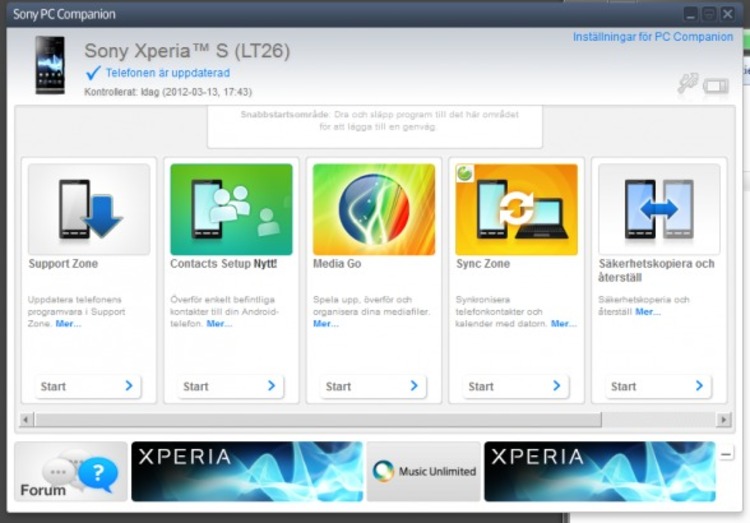
Download Latest Version Of Pc Companion From Sony Official Site .
Install In your Windwos pc
Then Install Windows Compablity mode Fow Windows 8, 8.1 User From ( Pc Updates)
Connect Phone With Pc And Check For Update
Download the Update
Install it
Methode 3- Using Sony Update Serives

Download Sony Update Services From this Link-Update.exe
Install It in your pc
Open it And Select Your Phone And Go NExt
Restart Your Phone in Bootmode(Using Hold Volume Down Key + Plug Usb In Phone)
Check For Update
Download It
And Insatall....
Note - MAke Backup of Your all Data Before Using Following Methodes.
For Any Help Leave Comments
Tag :
Android
CyanogenMod 11 Nightlies hit the Xperia SP
The Sony Xperia SP now has official CyanogenMod support. Nightly builds for CyanogenMod 11 started a few days ago, which means owners can enjoy Android 4.4.3 KitKat without having to wait on Sony’s upgrade plans.
As with any nightly build, do not expect a fully stable release, however most Xperia SP owners that have tried the CM11 release report a smooth performance. To try this for yourself, head over to the CyanogenMod website – remember that you’ll need an unlocked bootloader

Tag :
News
HTC M7 Dual Gets Sence 6 Update
The HTC One M7 from last year has already received an update to Android 4.4.2 and Sense 6.0 as promised earlier by HTC
In an email to the HTC Indian Division we raised our query about the Dual SIM HTC One M7 that has been sold in huge figures in India, as well as other major Asian Markets. HTC India was kind enough to answer our queries but their answers weren’t somewhat promising. The email Reply has been Quoted below.
” We are working hard to deliver the Sense 6.0 update to HTC One M7 at this moment, due to large amount of users initially having bought the SINGLE SIM Variant at present we are working on it’s completion. The DUAL SIM Variant will receive an Update to Sense 6.0 in the ‘Coming Week’ and shall be followed by HTC One Mini & HTC One Max.”

In an email to the HTC Indian Division we raised our query about the Dual SIM HTC One M7 that has been sold in huge figures in India, as well as other major Asian Markets. HTC India was kind enough to answer our queries but their answers weren’t somewhat promising. The email Reply has been Quoted below.
” We are working hard to deliver the Sense 6.0 update to HTC One M7 at this moment, due to large amount of users initially having bought the SINGLE SIM Variant at present we are working on it’s completion. The DUAL SIM Variant will receive an Update to Sense 6.0 in the ‘Coming Week’ and shall be followed by HTC One Mini & HTC One Max.”

Now as we said earlier the good folks over at HTC India didn’t give us any specific dates and they pretty much spoke what one could assume. In our opinion the Update should hit the HTC One M7 Dual SIM sometime in the 2nd week on June 2014 at max. That being said the wait doesn’t seem to get any easier witnessing the Single SIM HTC One M7 owners enjoying their Sense 6.0 Update. Stay tuned for more on this subjects, we have sent yet another query trying to get the “Time Frame” if not the specific date itself when the Sense 6.0 Update hits the Dual SIM HTC One M7.
Update : The update is now available in India for Dual SIM version. A user from Dheli has reported.
Tag :
News
New Xperia Port Apps Comes
Sony Gives new Updates of its Stock Theme Picker App And Call App.

In latest Xperia Z2 17.1.1.A.0.402 firmware Sony has changed the Xperia theme picker option by adding a “Tap + to add more themes” option besides a new window where chosen theme gets displayed. Check below screenshots to make out what we are talking about and compare it with your device’s latest KitKat Build
And The New Call App look Like

Port Apps Coming Soon.............
Tag :
Port Apps
Action Camera Extension Launch For SWR10 and SW2
Sony Has launch Its Brand new app Called Action Camera For Its Smart Watch. It Is used for just Controll
Sony Smart Camera wirelessly For Xperia Phones And Tablets. It Controll All camera suter function wireless.

You need to just pair the Action Camera Extension 1.00.12 app with your cam and you can control the shutter of your Sony cam within a range of 10 meters. When paired just get in the view of camera sensor and then tap on Sony SmartWatch 2 or Sony SmartBand SWR10 and you can take the pic with those accessories.
Sony Smart Camera wirelessly For Xperia Phones And Tablets. It Controll All camera suter function wireless.

You need to just pair the Action Camera Extension 1.00.12 app with your cam and you can control the shutter of your Sony cam within a range of 10 meters. When paired just get in the view of camera sensor and then tap on Sony SmartWatch 2 or Sony SmartBand SWR10 and you can take the pic with those accessories.
App = Action Camera Extension 1.00.12 app
Tag :
News
Download Truecaller PREMIUM Latest Version
Download Turecaller PREMIUM
Version 4.03 Pro.apk
All PREMIUM Features Unlocked
Features:

Version 4.03 Pro.apk
All PREMIUM Features Unlocked
Features:
• Caller ID - Helps you identify who’s calling before answering (Requires 3G or Wifi)
• Block calls - Gives you access to our extensive top spammers list and allows you to quickly block calls from all numbers reported as spam
• Reverse number lookup for both mobile and landline numbers – Truecaller even finds numbers to pre-paid phones
• Integrated with Twitter for boosted search results and communication options to Tweet and Follow a person directly from Truecaller
• Keeps your phonebook beautiful and up-to-date with photos and more from the Truecaller community, Twitter, Facebook, LinkedIn, Google+
• Enables you to create your own Truecaller profile
• Widget – See your call history from the launcher
• Block calls - Gives you access to our extensive top spammers list and allows you to quickly block calls from all numbers reported as spam
• Reverse number lookup for both mobile and landline numbers – Truecaller even finds numbers to pre-paid phones
• Integrated with Twitter for boosted search results and communication options to Tweet and Follow a person directly from Truecaller
• Keeps your phonebook beautiful and up-to-date with photos and more from the Truecaller community, Twitter, Facebook, LinkedIn, Google+
• Enables you to create your own Truecaller profile
• Widget – See your call history from the launcher
PREMIUM:
• See who’s viewed your profile
• No advertisements
• 30 contact requests per month to Truecaller members outside of your personal network
• See who’s viewed your profile
• No advertisements
• 30 contact requests per month to Truecaller members outside of your personal network

Download Link-Truecaller 4.03.apk
Tag :
Port Apps
ASUS Zenfone 5 Unboxing

Box Contents
- ASUS Zenfone 5 in gold colour
- Micro USB cable
- Travel charger with USB plug
- Headphones with mic and extra sets of ear buds
- Information booklet

Occupying the middle ground between the other two Zenfones, the 5″ ASUS device sports a 720p screen that is capable of digitizer input. Powered by an Intel Z2580 processor, this might not be the fastest phone out there, but its performance is good enough for daily tasks. Internals aside, the phone actually looks and feels well made, as evidenced by the picture below.

The back is slightly curved, lending a comfortable fit in the hands. The 8 MP camera on the back uses a BSI sensor and comes with optical image stabilization and the whole package is fondly called the “pixelmaster” by ASUS. The phone, although available really cheap in Taiwan, would be priced to compete with the likes of the mid range Micromax and Lava phones. So far, the phone, running a custom version of Android called “Zen UI”, has impressed us with its looks and general likeability, but we will be taking an even deeper look to see how it fares in our tests, later in the full review. So stay tuned for that, and until then, here are some more pictures from our unboxing of the Zenfone 5 .
Tag :
News
Angry Birds Epic released for Android, iPhone, iPad and Windows Phone

Features of Angry Birds Epic
- Turn-based battles between our heroic flock of warriors and those green snout-nosed scoundrels! It’s easy to play, but difficult to master!
- Explore a fantasy Piggy Island with everything from tribal villages and frosty mountains to tropical beaches and mysterious caves!
- Join Red, Chuck, Bomb and the other heroes as they face King Pig, Wiz Pig, Prince Porky and many more villains!
- Level up your characters, armor, weapons and potions to become a legendary hero ready to take on the mightiest pig warrior!
- Craft amazing battle-winning weapons like a wooden sword, frying pan or stick thingy with a sponge on top!
- Plenty of offbeat humor and tons of quirky characters dressed in awesomely silly costumes – like a prickly cactus hat and a matching sword.
Download Angry Birds Epic (Free with in-app purchases)
Tag :
News
LG brings McAfee Anti-Theft feature to LG G3
LG G3 will come pre-installed with a version of McAfee Mobile Security that includes a new anti-theft feature designed to protect users from unauthorized factory resets. This comes in the form of a Kill Switch which lets users disable their phones remotely in the event of loss or theft. Personal information is wiped out from the phone which saves it from compromising.
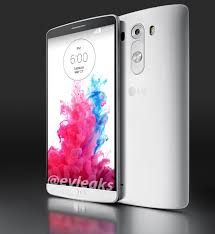
The implementation of the Kill Switch feature is just one of several specific measures we are taking to ensure that our users can easily and comprehensively protect themselves from the growing threat landscape, both physical and online.” said Dr. Ramchan Woo, head of smartphone planning division of LG in an official release.
Moving on, the partnership will also pre-install McAfee Mobile Security app that delivers antivirus, data backup, remote lock and wipe, and remote tracking free for five years. All other LG users may download McAfee Mobile Security for free on the Google Play Store.
Tag :
News
Outlook Web Access app for Android released
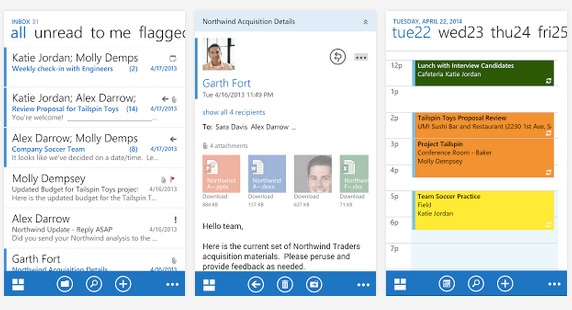
Outlook Web app for Android works only on Android KitKat 4.4 and higher. Also, users must have Office 365 business mailbox to use this app. It must be noted that this is a pre release and hence Microsoft will gather feedback and do some bug fixes. The app enables Android users to organize their email quick and easy with the Conversation View, Mark as Junk, Flag and Categories. You will also be able to search or browse email in all folders including Outlook Favorites.
With Outlook Web Access, you can also use inline apps for shipment tracking, Bing maps for addresses and even schedule meetings with free/busy and room finder features. The application supports voice control and lets users search for a contact or retrieve their schedule by using voice.
Microsoft also said in the blog post that it will keep adding support to other devices.
DownloadsFor Android
Download OWA (Pre-Release) (Free) -Android
Tag :
News
LG G Pad 7.0, G Pad 8.0 and G Pad 10.1 to roll out in starting this week


All these tablets have 7, 8 and 10.1-inch (1280 x 800 pixels) WXGA IPS displays respectively. These would be powered by a 1.2 GHz quad-core processors, 1GB RAM, expansion slot, front and rear cameras, WiFi and Bluetooth connectivity.
These tablets have QPair 2.0 that lets you connect it to other Android-powered tablets and smartphones via a simple Bluetooth to receive notifications of calls and messages on that and respond directly from the G Pad. LG also offers QPair 2.0 Software Development Kit (SDK) for developers. These have KnockCode security feature so that users can set custom knock patterns, Smart Keyboard and Dual Window, similar to G3 smartphone.
LG G Pad 7.0 specifications
- 7.0-inch (1280 x 800 pixels) IPS display
- 1.2GHz quad-core processor
- Android 4.4 (KitKat)
- 3MP rear camera
- 1.3MP front-facing camera
- 1GB RAM, 8GB internal storage, expandable memory with microSD
- Dimensions: 189.3 x 113.8 x 10.1mm; Weight: 293g
- WiFi, Bluetooth
- 4000mAh battery
LG G Pad 8.0 specifications
- 8.0-inch (1280 x 800 pixels) IPS display
- 1.2GHz quad-core processor
- Android 4.4 (KitKat)
- 5MP rear camera
- 1.3MP front-facing camera
- 1GB RAM, 16GB internal storage, expandable memory with microSD
- Dimensions: 210.8 x 124.2 x 9.9mm; Weight: 342g
- WiFi, Bluetooth
- 4200mAh battery
LG G Pad 10.1 specifications
- 10.1-inch (1280 x 800 pixels) IPS display
- 1.2GHz quad-core processor
- Android 4.4 (KitKat)
- 5MP rear camera
- 1.3MP front-facing camera
- 1GB RAM, 16GB internal storage, expandable memory with microSD
- Dimensions: 260.9 x 165.9 x 8.9mm; Weight: 523g
- WiFi, Bluetooth
- 8000 mAh battery
The LG G Pad 7.0 and the G Pad 8.0 would be available in White, Luminous Orange, Luminous Blue colors and the G Pad 10.1 comes in Black and Red colors. The G Pad 7.0 would start rolling out in Europe this week followed by other two tablets in coming weeks. LG has still not revealed the pricing yet.
Tag :
News
Facebook for Android gets offline likes, iOS app gets Nearby Friends
Facebook has updated its Android and iOS apps with few features. The version 11.0 update for iOS brings the ‘Nearby Friends’ feature that enable users to see which friends are close to you. Launched in April, the feature not only lets you check out nearby friends but also makes it possible to share your exact location with others


The Nearby Feature which is only available in the US also gets search and invite friends buttons. However, this is not listed in the official Facebook announcement and was first spotted by TechCrunch.
As for the Android app, the version 10.0 update will allow users to “like” posts, photos, and pages when they offline. Also, the app gets the ability to remove tags you have created and also the tags of yourself created by friends. Similar to the web, notifications can be turned on and off with the latest update.
Downloads
Tag :
News
Official Xperia Z2 Android 4.4.3 CyanogenMod 11 Nightlies rolled
A few days back CyanogenMod team rolled Android 4.4.3 CM11 build for Xperia SP officially and now Xperia Z2 has joined the list. Xperia Z2 Android 4.4.3 CyanogenMod 11 Nightlies build have been uploaded on the CM official website. This is the very first build from CyanogenMod for Xperia Z2 and as expected it has many bugs so if you are looking for a stable build, better wait for future updates.
In any case you are keen to install Xperia Z2 Android 4.4.3 CyanogenMod 11 build on your device you need to unlock the bootloader. Unlocking bootloadervoids warranty, backup your DRM keys before unlocking bootloader. Sony still has not mentioned its plan to roll android 4.4.3 update on Xperia devices.

In any case you are keen to install Xperia Z2 Android 4.4.3 CyanogenMod 11 build on your device you need to unlock the bootloader. Unlocking bootloadervoids warranty, backup your DRM keys before unlocking bootloader. Sony still has not mentioned its plan to roll android 4.4.3 update on Xperia devices.
Xperia Z2 Android 4.4.3 CyanogenMod 11
As tested by some users, present CM11 build for Xperia Z2 contains bugs for touchscreen, camera etc.
Download Xperia Z2 Android 4.4.3 CyanogenMod 11 build from below link.
Download-cm-11-20140611-NIGHTLY-sirius.zip
If you are looking for a stable android build for your device, this nightly build is definitely not that ROM so you better wait for some stable release from CyanogenMod team in future.
Seeing android 4.4.3 getting released over Nexus handsets, Sony is expected to soon come out with the details of android 4.4.3 schedule for their devices.
If any Xperia Z2 user has tested above mentioned android 4.4.3 build on their device, let us know what bugs you noticed. Drop your comments below.
Tag :
Firmware
Sony Xperia SP Android 4.4 & Xperia L Android 4.3 Update
Sony has never been the best in terms of Software Updates and this seems to get worse with the Xperia L and Xperia SP. The two smartphones have been waiting for the respective updates to Android 4.3 and Android 4.4 for a long time now but there isn’t even an official word from Sony yet, just leaks that indicate the June/July time frame. In the past month there have been talks about the Xperia SP being neglected for the KitKat update but this hasn’t been confirmed yet by Sony, on the other hand our sources over at Sony’s Indian division have provided us with some leaked update roadmaps and hints. These strongly pose to a June Release of the Android 4.4 KitKat for the Xperia SP and Android 4.3 for the Xperia L.

The Android 4.3 update was already provided to the Xperia M which is a cut down version of the Xperia L but the big brother still suffers with a buggy Android 4.4.2 update. It is only logical to assume that Sony will provide the Android 4.3 update to its mid range Xperia Smartphones but “When ?” is the real question here. The Xperia L will definitely skip the KitKat update according to one of the Engineers at Sony India (So will Xperia M, C & E) so that’s a long shot
 There are also some indications of the successors to the Xperia SP and Xperia L to be in works and if this turns out be true then Sony can even skip the Android 4.4 KitKat for the SP in order to boost sales of the newly launched Xperia device. While these are just rumors for now we can’t take them out of the picture as Sony is famous for it’s “Surprises”. Stay tuned for updates on this topic, as we are trying to get more details from our sources to end this chaos once and for all. Feel free to share your views in the comments section below.


Tag :
News
Update Samsung Galaxy Note 2 to Android 4.4.2 (All Methods)
The Galaxy Note 2 did quite well in sales and hence Samsung was generous enough to treat it with the Android 4.4.2 KitKat Update. The Update started rolling out a while ago and has now spread in a few countries (Mostly European & Asian). If you didn’t get the update yet and you can’t just wait any longer than you are in the right place as we have listed all the methods that you can use to update Galaxy Note 2 to Android 4.4.2 Official Update.


Over the Air (OTA)
In order to get the update via OTA you will need a working internet connection ( Wi-fi / Mobile Data) on your Galaxy Note 2. Once you have it you can then check for the OTA byGoing into Settings > More > About Device > Software Update > Update.
Samsung Kies
In order to get the update via Samsung Kies you will need a Laptop / PC. You can then install Samsung Kies if you don’t have it already, visit the link below to get it.
Download Link- Download Samsung Kies
Once you have Samsung Kies installed on your Laptop / PC then you will need to connect your Galaxy Note 2 to it via USB Cable. The Kies software will pop up itself and check for the latest updates available for you device. Also remember that if you don’t have the most recent version of Kies installed then you will need to update it prior to trying to update your Galaxy Note 2 or else it won’t be able to detect the latest Software Updates.

*Tip : Samsung Kies will also help you in backing up all the data and then restoring it once the update is complete.
Manual Method (via ODIN)
The Manual Method to update your Galaxy Note 2 to Android 4.4.2 requires a little more effort then the previous two, but you can update your device the very day the update comes out no matter which country or region you live in. This method is also suitable for all those who have either Rooted, using Custom ROMS or have bought the phone from a different country than the one they are living in.
Note : Please Backup all your data before proceeding with the Manual Method
Method
Step 1. Setting up ODIN Software
You will need to download and Install the ODIN Software and Samsung USB Drivers before you can update your Galaxy Note 2 to Android 4.4.2 via Manual Method.
Download--->
2-Usb Drivers(Skip if you have Samsung Kies Installed)
Step 2. Downloading the Update File (ROM)
Once you have ODIN and Samsung USB Drivers installed on your Laptop / PC you will need to download the update file. You can choose the one intended for you Model Number and also your Country / Region (If available).
Download-
Note : You can use the firmware for any country if the one for yours isn’t available yet. It won’t damage your device if you follow all the steps carefully. Also the Language Support is global in all firmwares.
Step 3. Using ODIN to update the Galaxy Note 2
After installing ODIN to desired location on your PC/Laptop open it and carefully look for the Tabs highlighted - The Auto Reboot and F.Reset Time should be checked and Re-Partition should be unchecked. Now in the PDA tab you must select the Downloaded firmware file from Step 2. (Use WINZIP/WINRAR to extract the file before using and it must be .TAR extension).
Note : In Some cases you get more than One file, if that is the case then you will need to the following steps.
a) Click the PDA button and select the file with .tar.md5 extension
b) Click the Phone button and select file with MODEM in its name
c) Click the CSC button and select file with CSC in its name
d) Click the PIT button and select .pit file
b) Click the Phone button and select file with MODEM in its name
c) Click the CSC button and select file with CSC in its name
d) Click the PIT button and select .pit file

Step 4. Connecting the Smartphone in Downloading Mode
In order to update the firmware on your Galaxy Note 2 you will need to enter thedownload mode. Press Volume Down + Home + Power Button all at once till you see a screen as below appear on your Note 2 (Image 1.) also enable USB debugging in the Settings > Developer Options.

Press the Volume Up key to continue and you will enter the Downloading mode on your Galaxy Note 2, once the screen (Image 2.) shows up connect the phone to the PC / Laptop via USB cable and wait for it show on COM Port in ODIN window (Repeat if unsuccessful), Now press the START button in ODIN. The firmware update should then start and you have to wait for it to complete. Once completed the phone will reboot itself. The Update will now progress in the official manner guiding you through the setup of the Android 4.4.2 on your Galaxy Note 2.
Note : If your Note 2 is stuck on Samsung Logo Screen then you must factory reset it (Wipe all data). To factory reset press Volume Up + Home + Power keys at the same time (Refer to the video guide below also you can like the video on YouTube for their contribution).
YouTube Video URL : https://www.youtube.com/watch?v=ud-F9sfCpuk
Tag :
Android,
Xperia 2013
Android 4.4.2 Update for Verizon Galaxy Note 2 starts rolling out
The Verizon bound Galaxy Note 2 owners can now share a smile as the much awaited update to Android 4.4.2 KitKat is now rolling out. The Software versionKOT49H.1605VRUFND7 will bring all the usual KitKat goodies and some more from Samsung themselves. The Update also shoots down most of the Bugs that were plaguing the users of the Note 2 since the Android 4.3 update was delivered to them.


Changes & Features of Android 4.4.2 update for Verizon Galaxy Note 2
- Android OS 4.4.2
- Samsung Knox 2.o
- Dual Persona
- TIMA Real Time Kernel Protection
- Emoji Support for Samsung Keyboard
- Galaxy Gear 2 Compatibility
- Smoother Interface
- Better RAM Management
- Updated Google App’s like Drive, News Stand & Photos
If you haven’t received an Update Notification yet then it might the time when youmanually check for it. You can do so by Going into Settings > More > About Phone >Software Update > Update. Also be sure that your Mobile Data Plan supports high usage or else use a preferred WiFi Network before proceeding to avoid unnecessary charges.


